Friday, May 22, 2015

Changing DSpace domain name

At Longsight, we've been hosting a DSpace site at saylor.longsight.com for over a year, this .longsight.com is an internal placeholder location for spinning up a new site, we control this domain space. When it comes time for a DSpace site to have a proper domain name, such as library.saylor.org there are a few steps.

1) Set up SSL
Get the SSL .crt and .key, add it to your nginx server, and configure your /etc/nginx/conf.d/.conf

You can test that you are listening to the proper hostname on 80 and 443, by editing your local development computers /etc/hosts
IP.OF.WEB.SERVER library.saylor.org

Get the sysadmin of saylor to CNAME library.saylor.org to saylor.longsight.com

2) Change all mentions of saylor.longsight.com to library.saylor.org in the config directory for this instance.

3) Write a SQL query to change the site url in all the handle metadata.


select * from metadatavalue where text_value like '%saylor.longsight.com%';
14000+ results


select * from metadatavalue where text_value like '%library.saylor.org%';
0 results

BEGIN;
update metadatavalue set text_value = replace(text_value, 'https://saylor.longsight.com', 'https://library.saylor.org');
COMMIT;

select * from metadatavalue where text_value like '%saylor.longsight.com%';
0 results


select * from metadatavalue where text_value like '%library.saylor.org%';
14000+ results

4) Reindex Discovery
You've changed metadata outside of the system, no Events were fired, so you'll have to manually force DSpace to refresh its metadata index.

bin/dspace index-discovery -b

5) Regenerate Sitemaps
Your sitemaps (for search engines) are outdated, and have a link to your old domain. Re-run the sitemap generator, for search engines to crawl your site, with updated URLs.

bin/dspace generate-sitemaps


6) Measure success of Google picking up the redirect
Search: site:saylor.longsight.com, there are 65,900 results
https://www.google.com/webhp?sourceid=chrome-instant&ion=1&espv=2&ie=UTF-8#q=site%3Asaylor.longsight.com

Search: site:library.saylor.org, there is 1 result.
https://www.google.com/webhp?sourceid=chrome-instant&ion=1&espv=2&ie=UTF-8#q=site%3Alibrary.saylor.org&qscrl=1

This will take several weeks for the search engines to recrawl and update their search index.

I add Google Analytics and Google Webmaster Tools, and re-upload the sitemap, to ensure to robots pick this up ASAP.

Friday, November 21, 2014

How to replace all tab and newline characters in a Google Docs Spreadsheet

I've gotten a spreadsheet that is riddled with tab characters and newlines. It's so bad that the reader of this can't process this. So. If I could just remove all tab characters and newline characters from the spreadsheet, I'd be golden.

My first through was, how do I paste in a tab character, or a new line character.. What's the five sequence command to do that. Well, Google Sheets has a much easier way: REGEX.

"\t" is regex for tab, and "\n" for newline.
Find: \n to find newlines   Replace with a space, and check regular expressions

Find: \t to find tabs   Replace with a space, and ensure regular expressions is checked.


I found a full list of regular expression characters at: https://help.libreoffice.org/Common/List_of_Regular_Expressions


Thursday, October 09, 2014

Play Framework: IntelliJ IDEA cannot find declaration to go to

I'm doing a Play! Framework project, and all of a sudden, IntelliJ IDEA forgets about everything, doesn't provide any autocomplete / intellisense, doesn't check syntax, doesn't check my imports, nada, kinda just a text-editor like Sublime at that point.

What I'm using:
- play! framework 2.3.5
- IntelliJ IDEA 13.5.1
- SBT 0.13.5
- Mix of Java and Scala
- Activator UI
- OSX Maverick

Bascially my issue/sympton is: IntelliJ cannot find declaration to go to in Play Framework, and provides no autocomplete / syntax check support.

Stack Overflow had me Invalidate Caches and Restart. ehh, wasn't enough.

Solution: Specify JDK for Scala to JDK 1.7

I'm on OSX, so Linux/Windows users will have to ad-lib.
IntelliJ -> Preferences -> IDE Settings -> Scala -> JVM SDK
Mine was oddly set to , thus nothing worked, so I flipped it to JDK 1.7, and then re-ran Invalidate Caches and Restart. A few minutes later, and I'm back in business.


Friday, October 03, 2014

Using PDFBox to create a PDF and PdfLayoutManager

I'm looking for documentation for creating a PDF with Apache PDFBox, and I'm hitting some limits. Either I'm not figuring out how to use this tool, or it doesn't have API's for how to draw what should be basic things.

So, there's a project from Glen Peterson to add PdfLayoutManager, which should be contributed upstream to PDFBox. Anyways, I was testing out his additions to the project, and here's the PDF it generates (I've removed the image it add to the PDF, I didn't want to include the resource bundle):

Here is a series of screenshots of the output of this. It can wrap text, make tables, draw shapes, insert an image, and specify colors.


Wednesday, September 24, 2014

DSpace: Harvesting an external collection using OAI-ORE

Would you like to create a collection in DSpace that is automatically capable of mirroring content from some other source? Well, if that external source support OAI, your in luck. First a quick primer: OAI has two modes, OAI-PMH (metadata only), and OAI-ORE (also get the bitstreams / content files). If you only need the metadata for metadata-records only, you'll be fine with OAI-PMH, if you also want to reference, or store the bitstreams into DSpace, then hopefully your data provider support OAI-ORE. DSpace by the way supports both OAI-PMH and OAI-ORE. So you can harvest a DSpace collection and get metadata and files.

First: Create a new Collection in DSpace.

Second: Edit Collection - Content Source - OAI Provider
In DSpace, go to Edit Collection, then click the tab for Content Source.
Then choose the option that "This collection harvests its content from an external source".
Once you save, you can then enter the OAI provider base url, then enter the set ID. Also there is an option to choose between "Harvest Metadata Only", or, if the data source supports ORE, you can either choose to have a reference to the files, or have DSpace download the files, and store them in DSpace.


Once you Save, then you get the option to "Import Now".

Import Now will import this right now. Reset and Reimport will delete the previously harvested contents, and reimport.

You can also see all of the collections that have OAI Harvesting enabled from your Control Panel:


Lastly, if you find yourself harvesting from a source that is going to regularly update their contents, and you want to regularly harvest their content, then setup a cron task to have DSpace Command Line harvest the collection each day.

peterdietz:dspace peterdietz$ /dspace/bin/dspace harvest --start
Starting harvest loop... running. 

Thursday, September 11, 2014

DSpace Additions: Author page and Altmetric statistics badge

It's a mixture of big things and little things that can add additional value to your DSpace site. Two interesting additions that I've recently stumbled upon are: Researcher Pages, and Altmetric statistics badge.

Researcher Pages

A project between @Mire and The World Bank's Open Knowledge Repository is to add author pages to DSpace. Thus far, it appears that it shows the author's name, a photo of the author, their biography, and a list of their item's in DSpace that they are an author of.
This is in use at: https://openknowledge.worldbank.org/author-page?author=Abras%2C+Ana+Luisa


Altmetrics Statistics Badge

For articles that have a DOI, you can integrate with the Altmetrics statistics service to display a badge of alternative usage of that article. Altmetrics are things like people citing the paper, mentioning them in a social network or blog, or adding it to your Mendeley library. I've seen this integrated into DSpace by Longsight's Sam Ottenhoff for Marine Biology Laboratory / Woods Hole Oceanographic Institution Open Access Server.


See DSpace and Altmetric's in use at: https://darchive.mblwhoilibrary.org/handle/1912/6598

Monday, August 25, 2014

DSpace OAI profiles

By default in DSpace, OAI-PMH will share all of your public accessible Items in DSpace through OAI. In case you wanted to restrict or modify the set of results that get shared, you would have to customize the ouput, luckily recent versions of DSpace have an easily modifiable configuration, that essentially gives you "profiles" in OAI.

The default profile is called "request", it doesn't filter the results, and it allows harvesting in many different metadata formats. Note: only publicly accessible items/objects can be disseminatable through OAI.

The other profiles in DSpace are OpenAIRE (Open Access Infrastructure for Research in Europe) and DRIVER (Digital Repository Infrastructure Vision for European Research). By default your repository won't disseminate any objects in OpenAIRE or DRIVER format because the filters in place require some specific metadata to be collected for those profiles/guidelines.

https://github.com/DSpace/DSpace/blob/dspace-4_x/dspace/config/crosswalks/oai/xoai.xml#L33

The DRIVER profile declares a number of filters, which restrict the items that disseminate under that profile, to match the requirements of DRIVER. In this case the filters will require: that there is a title (dc.title), that there is an author (dc.contributor.author), that the document type (dc.type) is one of article, thesis, book, etc,  also that dc.rights is equal to "open access", and lastly that there is a publicly accessible bitstream, hopefully that means that the full text is available.


So, in case you wanted to customize your default "request" profile to restrict the output to all items in the repository that also had full-text available, you would customize:
 <context baseurl="request">  
 To add:  
 <filter refid="bitstreamaccessFilter"/>  

In addition to this information about DSpace OAI profiles, I did run into some bugs or potential issues in the DSpace XOAI code base. For one, there are two modes to run DSpace XOAI in. There is either database mode, where the database responds to all OAI queries, or a performance optimized version, where SOLR indexes your repository. One of the bugs was that the solr mode had a slightly different interpretation of "bitstreamaccessFilter", i.e. database required that there was an original bundle bitstream, the solr version only required that the item was public. To correct this I've patched our code at Longsight, and have contacted the XOAI author to confirm and test the issue.

Monday, July 21, 2014

Improving DSpace Presentation: Video Player and Document Viewer / BookReader

One of the fun goals for DSpace that we have at Longsight, is to make using DSpace a great experience. We've got some more ground to cover, but today we have a BookReader and a Video Player to demonstrate.


The BookReader for DSpace uses the Internet Archive BookReader player to present scanned pages of a book in a format that looks like a book. Put the image of the left page on the left side, and the right page on the right side, and when you turn the page, they change both pages. Simple idea, and when executed properly, it makes the content look much nicer.


An example of this BookReader can be found at: https://trydspace.longsight.com/handle/123456789/77#page/1/mode/2up


The Video Player for DSpace uses flash, and plays the video right in your browser. It is not a true streaming solution, but rather, makes use of progressive download, so you can play what has been downloaded, but you won't be able to skip ahead in the video beyond what has been downloaded.

You can view an example of the video player at: https://trydspace.longsight.com/handle/123456789/68


Longsight provides Hosting, Support, and custom development solutions for DSpace, the Digital Repository / Digital Asset Management system for libraries and institutions.

Wednesday, May 28, 2014

DSpace Development at Longsight

I've been a DSpace Developer at Ohio State University for about 5 years, and recently I have changed jobs to work at Longsight, a Registered Service Provider for DSpace. They also have a few other stacks that they support, such as Sakai LMS, and LAMP, such as Drupal and Wordpress. Basically it revolves around solving problems for higher ed, using open source software. They provide hosting, training, consultation, and custom development. So far I've been on a few consultation-setup-hosting-training-development adventures in my time with Longsight, and its fun.

Peter Dietz
+
DSpace
=

Longsight


One thing I really enjoy at Longsight is that there are always problems to solve, and it becomes my job to come up with a creative way to solve the problem. Also, I feel like I score bonus points when the solution that works for a client, can also be contributed upstream into the next release DSpace, to be benefit everyone. Additionally, I get to meet with clients, sometimes over the phone, other times in person, and there is also meeting people at conferences. This year, I'll be in Helsinki Finland for Open Repositories 2014, come say hi. I'll be presenting on the REST API for DSpace. I'm also taking a bit of a traveling/working/holiday across parts of Scandinavia, you can be "at work", anywhere with internet.


Anyways, I have a number of development projects that I've been working on.
  • better Request-Restricted-Item workflow, adding a helpdesk workflow, with buttons to contact the requester, and author of the work.
  • Mime-Type-Icons for content without thumbnails
  • Document Viewer 
  • Displaying Thumbnails of Restricted Content, instead of showing a broken-image 
  • Statistics converter between SOLR to ElasticSearch
  • Customizing, and extending Mirage2 XMLUI theme, and making custom-branded derivative themes, to match each clients design palette.

Not to sound like a sales pitch, but, if you need DSpace Hosting, or DSpace custom development, keep Longsight in mind, we do good work, have fair prices, and we love contributing our work back upstream to improve the DSpace community. Plus, it will give me some fun work to do.


Tuesday, May 14, 2013

Using Restlet to build a Java API

I'm working on building a Restful Web Services API for a Java Application that I'm active on. My initial direction for getting started was to look into JAX-RS (Java's API for building restful web services), and then noticing that JAX-RS 1.0 has been out for quite some time, and then noticing that JAX-RS 2.0 was getting approved right before my eyes. Assuming that JAX-RS2 is the successor to JAX-RS1, one might as well stay on the latest edge. JAX-RS 2.0 is now approved by the Java Community Process, so, assuming there are implementations worth using, you can get going now!

Well, I'm stumbling through this "decision matrix" of which implementation to choose, and Stack Overflow only gets you so far. So, for now, I'm doing a technology "Spike", and am working through researching RESTlet to be my horse to build an API upon.

Tangent

I've recently picked up some Rails development, and I'll note that documentation and getting started started guides are rampant throughout that ecosystem. So, Rails is a nice platform that provides as little friction as possible to someone getting started.

Getting Started with Restlet

I found some Maven settings to add to a new project pom.xml, which allowed me to get started quickly. (Note: I had used this originally, while the Restlet version was pegged at 2.0.0)
Add to your pom.xml to add Restlet 2.1.2 to your maven project.


I then started reading the book "Restlet in Action", and hit a stumbling block with the following code:

public class AccountServerResource extends ServerResource implements AccountResource {
    private int accountId;

    @Override
    protected void doInit() {
        this.accountId = Integer.parseInt(getRequestAttributes().getAttribute("accountId"));
    }

This .getAttribute("accountId") does not exist in Restlet 2.0.0, so I did a bit of panic, and tried to re-write the code to something analogous I guess, like: 

@Override
    protected void doInit() {
        this.accountId = Integer.parseInt(getRequestAttributes().get("accountId").toString());
    }


Not as pretty, but if it works.. But then I'm stuck with not being able to follow along with the book. And I'm assuming that the book was reviewed. So, I take a different approach, maybe I'm using the wrong version of Restlet? I jumped to the Restlet maven repo, and found that the latest stable version, and the version that matches the book is 2.1. So, I changed my pom to use version 2.1.2, previously I was using Restlet 2.0.0.


Thus far, Restlet is so-far-so-good. But, its a lot of learning, when I really just want to get to "done" faster. I'm not sure what getting-started route I would recommend for another developer that I would on-board to this project. i.e. I layed this groundwork, build on top of that, and read some getting started guides, as opposed to starting from scratch with the book.

The application that I'm actively working on is DSpace, the institutional repository, asset management system.

Wednesday, March 20, 2013

I've managed to run out of memory with 16GB!

I've been upgraded to a MacBook Pro with 16GB of memory, not 4GB, not 8GB, but 16GB.

And.. Thats somehow not enough, since I've been able to (through normal work) run out of memory. I don't blame Java. (Kidding...)


[ERROR] FATAL ERROR
[INFO] ------------------------------------------------------------------------
[INFO] Java heap space
[INFO] ------------------------------------------------------------------------
[INFO] Trace
java.lang.OutOfMemoryError: Java heap space
at java.util.Arrays.copyOf(Arrays.java:2882)

Maven skip license check

I recently ran mvn install on a big Java project that I work on, but it kept failing due to some files not having the proper license headers. Well, thats not my concern right now, how do I skip that?

To skip the maven license check, add:

-Dlicense.skip=true

So, my full command (which also skips running the unit tests) is:
mvn clean install -DskipTests=true -Dlicense.skip=true

I suppose you should add yourself a future task of eventually making all of your files have the proper license headers, but you can continue on what you meant to do for now.

Monday, August 20, 2012

Debugging an SLF4J error, mvn dependency:tree to the rescue

As a Java developer, I frequently add additional dependencies to maven as new features are being built.  Sometimes you don't know what will break your build, but here's my "stack trace", as I worked through solving an error from:

 peterdietz:dspace-3.0-SNAPSHOT-build peterdietz$ /dspace/bin/dspace dsrun  
 Exception in thread "main" java.lang.NoSuchMethodError: org.slf4j.spi.LocationAwareLogger.log(Lorg/slf4j/Marker;Ljava/lang/String;ILjava/lang/String;[Ljava/lang/Object;Ljava/lang/Throwable;)V  
      at org.apache.commons.logging.impl.SLF4JLocationAwareLog.info(SLF4JLocationAwareLog.java:159)  
      at org.springframework.context.support.AbstractApplicationContext.prepareRefresh(AbstractApplicationContext.java:456)  
      at org.springframework.context.support.AbstractApplicationContext.refresh(AbstractApplicationContext.java:394)  
      at org.dspace.servicemanager.spring.SpringServiceManager.startup(SpringServiceManager.java:207)  
      at org.dspace.servicemanager.DSpaceServiceManager.startup(DSpaceServiceManager.java:205)  
      at org.dspace.servicemanager.DSpaceKernelImpl.start(DSpaceKernelImpl.java:150)  
      at org.dspace.app.launcher.ScriptLauncher.main(ScriptLauncher.java:51)  


Basically the error above means that you've got two different (incompatible versions of slf4j present 1.6 and 1.5). If your build output has a lib/ directory, check that for jars that have slf4j in their name. If you've got two different versions, thats your problem. Your quick fix would be to delete one of the versions (most likely 1.6).

However, to actually fix your problem, you've got to stop Maven from including two different versions of SLF4J. You can "Find in Path" from your IDE to see if you are manually including two different versions of SLF4J, but thats likely not the case, you'll need to look at Maven's dependency tree to see what has snuck both versions into your build.

mvn dependency:tree

Maven Dependency Tree will process all of your imports, all dependency entries in your pom.xml files, and recursively give you a tree output that will show which parent project includes which sub-project, which includes some feature, which includes which JAR. In my case, I was hunting down jcl-over-slf4j-1.6.1.jar. And looking through the output of mvn dependency:tree, I found it.


[INFO] +- org.dspace:dspace-stats:jar:3.0-SNAPSHOT:compile
[INFO] |  +- org.apache.solr:solr-solrj:jar:3.5.0:compile
[INFO] |  |  +- org.codehaus.woodstox:wstx-asl:jar:3.2.7:runtime
[INFO] |  |  \- org.slf4j:jcl-over-slf4j:jar:1.6.1:compile

To solve it, I found my pom.xml for the dspace-stats project. And specifically, the import for solr-solrj

 <dependency>  
   <groupId>org.apache.solr</groupId>  
   <artifactId>solr-solrj</artifactId>  
   <version>${lucene.version}</version>  
 </dependency>  


This will include solr-solrj, and all of its neccessary dependencies, and according to the dependency:tree, this is where slf4j has snuck through. So, we need to exclude slf4j from coming through, luckily maven lets us do exactly that. So, add the <exclusions> block below to this <dependency>, and you should be able to rebuild, and be all set. 

 <dependency>  
   <groupId>org.apache.solr</groupId>  
   <artifactId>solr-solrj</artifactId>  
   <version>${lucene.version}</version>  
   <exclusions>  
     <exclusion>  
       <groupId>org.slf4j</groupId>  
       <artifactId>slf4j-api</artifactId>  
     </exclusion>  
     <exclusion>  
       <groupId>org.slf4j</groupId>  
       <artifactId>jcl-over-slf4j</artifactId>  
     </exclusion>  
   </exclusions>  
 </dependency>  
Good Luck!

Friday, July 20, 2012

How to Easily Delete EVERYTHING in iCal

I've had some issues with OSX iCal, where the sync with work's Exchange server got interrupted when I changed my password, I then added some events to iCal, noticed syncing wasn't working, created the event again directly in Exchange using Outlook, and then realized that I had to edit iCal's settings to change the exchange password to resume syncing. This caused mysterious sync problems with iCal, and it would run into issues of event conflicts, and would take turns going online, offline, and then sending email notifications to co-workers that I'd accepted or declined their event. After about the third time it went online, offline, online and resend email notifications, I've decided thats enough, and would like to start fresh with iCal. However, Apple has "The Apple Way" of deleting all events, and all everything from iCal, and it makes no sense to me. Thus, I have to create a posting on:

How to Easily Delete EVERYTHING in iCal

So you can perhaps re-enable sync with your server.

Step 1 - Remove Server Sync Accounts

You don't want to delete any events that are safely stored on the server. So go to iCal -- Preferences -- Accounts, and then delete your server account (Exchange in my case).

Step 2 - Realize that there's no Delete All button in the iCal preferences or anywhere, and start Googling for advice, and hopefully arrive here at this blog post.

Go to: www.google.com
...

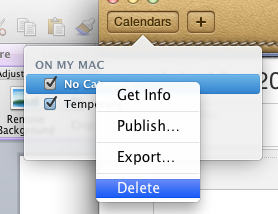
Step 3 - Go to the Calendars button, create a new Calendar, and delete your existing Calendar.

After your server account is deleted, the Calendars button should have a default Calendar called "No Category". You can't delete that if thats the only calendar that exists, so create a new calendar, by Right Clicking, and adding a new calendar.


After the new calendar is created (I called it Temporary), you can delete the old calendar that has the offline / synced events that you wish to delete. To delete your old / cached information, right click on "No Category" and select Delete.


And accept the confirmation to actually delete everything. 


Warning: If that was your Calendar that had all your information, it will delete it. Please ensure that you've followed the above advice before clicking Delete (for reals), that you've removed your sync connection to any of your server based calendar systems (such as Exchange), so that you don't actually delete your Calendar events that you perhaps share with your colleagues.

Wednesday, March 07, 2012

On The Desktop, Changing from Linux to OSX

I wanted to make an immediate, I switched to OSX blog post, but I didn't want the takeaway to be too temporal.

After using OSX full-time for atleast the past month as my primary desktop, I've gotten to know what I like and don't like about the switch. Hopefully some desktop developer stumbles upon this an implements the improvements, otherwise kudos to those who've built the good parts.

What I immediately and still desperately miss after having left Linux (primary distribution is Ubuntu), is that OSX does not have a tier one blessed software repository. I can't explain how nice it is to be able to install all of your software through something like: apt-get install package-name. I don't want to install git by going to their website, downloading a disk-image, and launching an installer. I believe that a package manager is mandatory for an OS. I guess the App Store attempts to approximate this, but its so far from impressive. When you launch the App Store, then search bar isn't selected by default, and the App Store should work from the terminal as well. How about:

sudo app-store install photoshop


Now, what I really really like about OSX, is how stable it is. Apps don't crash, and if they do, I'm very surprised. So much so, that you almost feel compelled to complain about it to the developer (which as an ecosystem, probably helps to fix bugs). On Ubuntu (especially the post-10.10 era), apps and core services crashing is so common that I disabled feedback reporting because even that too would crash, and cause more popup windows to report bugs.

I also like how easy most of the system is to manage. Top left-corner Apple Icon with all the bells, knobs, and whistles are easy to click and change most things. Very excellent. Command Space to launch Spotlight so I can easily search to find apps, and all the results show up nicely grouped, with the one I'm most likely to click on being the top hit, and hitting Enter then launches that, ohh yes!!


I don't know if there are patents protecting those works-really-well parts, but its just behavior. If I were Desktop Linux, I would copy that verbatim, and frame a picture of the designer at Apple who created it. I might even buy him a beer, a Trappist Ale, or perhaps even a Framboise.

Another big win in OSX, is how well the gestures work. All Apps should allow for back-button support with a simple swipe. Also, the hardware is nice. I really like the keyboard (I have the wider keyboard with  Home / End and delete buttons, which is great since I hit those buttons all day long)

That said, theres still plenty of unexpected, un-intuition in OSX.
How does one always show hidden files and folders in Finder?
- (Edit a system variable in terminal, or get An-app-for-that).

How does one browse their filesystem, when all Finder is doing is showing me a coverflow of all of my images?
- (Hit Command UP, until you get to your /Users/myusername directory)
I would prefer having a location bar at the top, so I can atleast type in the directory path that I'd like to be at. I kind of see how "The End User" would like meta-displays the abstract folders, and just show them their music, pictures, and documents, but I'd like to opt-out of that.

How does one open an application that updated itself when it shut-down?
- (You can't use the Spotlight quick find, because it now has the translucent crossed-out circle around its launcher. So you have to open the Application's list, and click it and allow the "From the Internet" app to run yet again. Even if the update caused this app to be "From the Internet", it still should have showed up in Spotlight. You can keep the crossed-out-circle icon to show its currently disabled, but Spotlight needs to always work.)

How do I get my Home key to go to the first character on a line, and End to the last character on a line, as opposed to first character on page, and last character on page?
- (There an app for that. There built-in configuration doesn't allow remapping...)

How does one see all the messages in a email thread in Mail.app from the sender and all others in the thread, and my response inline as well? You know, I'd like to see all my responses to a client within the email thread...
- (Command click to select Inbox, and Sent ?? really?!?. I guess that would follow the Apple design guide, but I would say that Gmail has quickly claimed the title for best email interface, especially with its immensely fantastic threading. In that case, the Gmail way trumps Apple standards, and awesome-threading should be the default view.)


In the end, I'm happy on OSX, its a very solid Desktop Interface that "just works", so I can be productive. I suppose some of this rant is just someone coming in from outside-of-Mac, and they're "used to the old way", but its a case where I'm convinced that certain conventions are just better.  I'm not sure you could measure it up precisely to say that this action that I do 47 times a day is 0.32 seconds faster on OSX thus gaining me x hours a year in productivity to justify the higher cost. But its very much like a nice car, nice bicycle, or even a nice wheelbarrow, and it does what you'd expect it to very well. So much so that its now my preferred tool.


Friday, November 04, 2011

Enhancing DSpace Statistics - Collection Report

Currently, we're in the process of enhancing our statistics for our local DSpace instance.
The first step is to go through and make sure we have good data. This involves kicking out robots, and other usage abuse, as well as ensuring we've captured information from the log activity.

The second step is reporting what we've got. Thus far, we're working in a few directions to add more reporting information, this post will be the first in a series of explaining some of our new reports.

Collection Statistics
The collection statistics page in DSpace 1.6+, i.e. Solr statistics in DSpace doesn't show you very much. Atleast it doesn't show you very much that your interested it. Its almost irrelevant how many hits the collection page received, you are mostly just interested in the usage of the content within the collection.


Thus far, we've added Top Bitstreams and Top Items.

Top Items for the past month shows total for the time period and daily hits.
Top Bitstreams for the past month shows total for the time period and daily hits.


We've also added the ability to download a CSV report of the bitstreams and items within the collection right from the statistics page. The benefit of offering the CSV is so that the user can then do what they want to do with the data that we're not offering through our web interface, and so that we can deliver more information when its in a spreadsheet, as opposed to trying to display data in the browser.

Statistics Report of all items in the collection as CSV

Statistics Report of all bitstreams in the collection as a CSV


We don't have source code publicly available for how to do this, but in XMLUI we've just altered StatisticsTransformer.java in XMLUI to add the additional "views" of top items within collection. And for the CSV reports, we've added a servlet that listens responds the URL "usage-event". An example would be dspace.example.com/usage-report?owningType=4&owningID=148&reportType=0 which generates a csv report for community with community_id 148, and it reports on bitstreams.

DSpace Types are:
0 = Bitstream, 1 = Bundle, 2 = Item, 3 = Collection, 4 = Community.

owningType is the type of the parent
owningID is internal ID of the parent, once you've determine which type it is
reportType is the type to report

Thus far the only gripe about generating the servlet to report is that there is a strong coupling between dspace-statistics, solr, and XMLUI, so we had to keep this servlet in the dspace-xmlui-api namespace as opposed to the preferred dspace-api.

Monday, October 31, 2011

Wednesday, August 03, 2011

Resources for Developing and Using DSpace

Since I'm pretty active with working on and developing for DSpace, I've decided I should compile a list of resources that I frequently point to. These resources will be useful for people using, installing, managing, or developing with DSpace, the repository software for archiving your important data.

Documentation

Official DSpace Documentation
https://wiki.duraspace.org/display/DSDOC/DSpace+Documentation

Official DSpace Installation Documentation


List of DSpace Installation Guides for easy deployment on your OS (Windows, Ubuntu, Mac, RedHat)
https://wiki.duraspace.org/display/DSPACE/Installation

The easiest guide for installing DSpace, on Ubuntu.
https://wiki.duraspace.org/display/DSPACE/Installing+DSpace+1.7+on+Ubuntu

Useful wiki maintained by SUNScholar in South Africa
http://wiki.lib.sun.ac.za/index.php/SUNScholar/IR

DSpace JavaDoc, readable documentation generated from DSpace Java code
http://projects.dspace.org/8/apidocs/


Obtaining the DSpace Code
Source Forge - Official SVN Repository
http://scm.dspace.org/svn/repo/dspace/trunk/

Source Forge - Download ZIP of the code
http://sourceforge.net/projects/dspace/files/DSpace%20Stable/

GitHub - unofficial mirror to Git
https://github.com/DSpace/DSpace

Modules - Supported Additions to DSpace
http://scm.dspace.org/svn/repo/modules/ (CODE)
https://wiki.duraspace.org/display/DSPACE/Modules (Wiki / Documentation)

Mailing List Archives (dspace-tech)
DSpace-Tech mailing list is the usual hangout for questions on DSpace. Typically it will have people troubleshooting their installation, working on a new feature, having questions on how to change their metadata. There is also dspace-general which is generally for repository admins to get announcements without getting too much traffic that you would be prompted to unsubscribe. DSpace-devel is geared towards developers, as someone will often pose questions about refactoring the code. However, dspace-tech is probably your best bet.

Nabble - My favorite place to see the DSpace mailing list archive is at Nabble, since it has a nice presentation, and it is really fast. I like how it shows the users picture.
http://dspace.2283337.n4.nabble.com/DSpace-Tech-f3276945.html


Mail Archive - Shows posts in their threaded hierarchy. Fast, and easy to search.
http://www.mail-archive.com/dspace-tech@lists.sourceforge.net/


Source Forge -- Official Archive of the DSpace-Tech. The presentation is not that great, its also really slow. Your better off using nabble, or mail archive. However, you should subscribe from sourceforge.
http://sourceforge.net/mailarchive/forum.php?forum=dspace-tech


DSpace Developers,
I've added DSpace Developers that I'm aware of who have blogs. Most people are probably posting their status updates to social networks, Twitter or Google+ these days. But written up articles still appear in their blogs.

Stuart Lewis - Developer/Manager in New Zealand
http://blog.stuartlewis.com/

Kim Shepherd - Developer in New Zealand
http://kim-shepherd.blogspot.com/

Mark Diggory - Developer for @Mire in San Diego, CA, USA
http://mdiggory.wordpress.com/

Peter Dietz - Developer in Columbus, OH, USA. Works on Ohio State Knowledge Bank.
http://peterpants.blogspot.com/

Hired Help
Above and beyond the resources available to you so you can help yourself. There are also companies that exist who live and breath DSpace, and are available to provide premium enhancements to your repository, provide DSpace hosting, customization and branding, training, and custom development for a new feature that you are dreaming up.

DSpace calls them Registered Service Providers.

Some of the vendors I've met (and have positive reviews of) are:


Other Resources
Other things that exist that might be helpful to check out.

JIRA - Bug Reporting

Demo Instance of the latest version of DSpace.

IRC Channel, to chat with other DSpace developers
FreeNode #dspace

Sunday, April 03, 2011

Ubuntu 11.04 Unity: How to Disable Unity Autohide

Ubuntu 11.04 comes default with Unity, a slick new user interface that helps for users with limited space, i.e. Netbooks. However, I have dual 23 inch monitors, I have more than enough space for menus and options, and when things are shrunk to please the un-power-users, it really pisses off the power-users. So, instead of griping and disabling Unity altogether, and going back to pure Gnome, I'll stick it out with Unity, lest I be ridiculed for being resistant to change. Plus, lots of man-hours went in to Unity, so I'll give it an honest attempt.

First Major Gripe: Unity auto-hides, and thus my taskbar is gone.
I do FAR MORE on my computer than just surf the web. I'm a programmer, so I have my editor windows open (atleast two), I have several terminal windows open. I also have several images open, I'm constantly taking screenshots. And I always have gedit open, for just pasting some text for a period of time. So, without a taskbar, I'm significantly hamstrung. And having to mouse over the Ubuntu icon, or mouse over it, and then jiggle it until the Unity bar full of installed applications pops up, is very very sucky.

FEATURE REQUEST: Allow me to right click somewhere in the Unity bar launcher and have an option for Preferences that takes me to the setting manager, and have the setting-manager installed by default.

1) To disable auto-hide, you first gotta install the setting manager for Unity.
sudo apt-get install compizconfig-settings-manager


2a) Open System Settings (to eventually find compiz-config to eventually find unity-config)
To open the newly install setting manager, I've found it by clicking the power button in the top right corner, and going to System Settings.


2b) Find compiz config (so we can then find unity config)
From the System Settings, search for compiz, and click the first result.


2c) Find Unity config
From the CompizConfig Settings Manager, search for Unity, and click the first result.


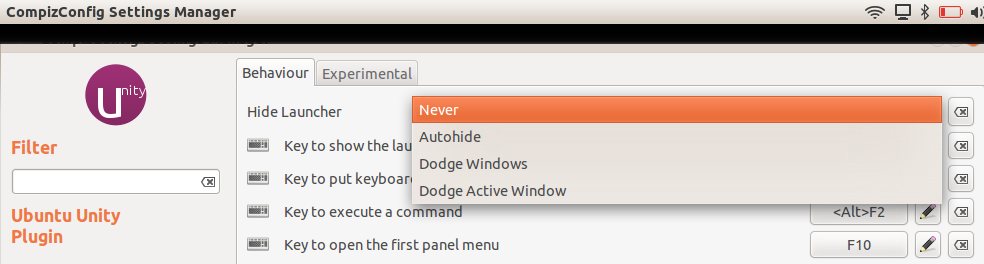
3) From Ubuntu Unity Plugin, change Hide Launcher to: Never


Now, the Unity launcher will never autohide.

Future gripes:

  • where is the show desktop button?
  • how do I use Unity to switch between multiple instances of the same program open. 
    • i.e. Chrome window 1, and Chrome window 2. (assume I've never heard of Alt-Tab). 
    • Perhaps Unity UI team can borrow inspiration from Windows 7, and mousing over an icon in the Unity launcher will then show thumbnails of all running instances of that program.

Friday, April 01, 2011

IntelliJ Idea: Frustrations with "cannot resolve Java"

I'm trying to convert myself to using IntelliJ IDEA, as word on the street is that thats what the power developers are using. I'm pretty sold on NetBeans myself. Its pretty, it works every time, its really intuitive and easy to use, it does the task at hand without cluttering me down with loads of crap.

My initial impressions of IntelliJ IDEA are that, I need to force myself to enjoy using it. Hopefully my obstacles to using IDEA will be resolved so I too can get with the program. In this post I'll shed some light on solving a big nasty roadblock I ran into with IDEA.


The Problem:
IDEA doesn't know what Java is.

My first sign that something is very wrong:
IntelliJ IDEA Cannot resolve symbol 'String'

IntelliJ becomes very annoying when it can't find the JDK. It will however prompt me every 10 seconds, that it recommends me to use org.apache.xpath.operations.String, instead of Java's in-built String. It will recommend me a whole crapload of things, such as detecting Spring, wanting to add IDEA project files to the git repository, but it won't detect that I don't have a JDK set.


The nail in the coffin:
IDEA: Cannot resolve symbol 'java'


This does wonders for programmer happiness, in fact, IDEA actually made me frustrated. Even though IDEA was the only IDE that had a certain feature that would be its selling point for me, all of that erases when it doesn't know what Java is, and doesn't give me Code Completion for String.

The Fix:
Properly set the IDEA Platform JDK for your project/module.

Go to Project Structure (Ctrl+Alt+Shift+A), and ensure that Platform Settings[SDK's] has your path for Java set, in my case /usr/lib/jvm/java-6-sun, and then the main fix:
Set the Project Settings[Project] --> Project SDK to your current JDK. I had mine set to none for the project I was working on. Therefore, no java, no string, no primitive types, no nothing.

Once you set that, it should kick off a reindex, and your project will have full Java support. I suppose during the install of IDEA, it didn't detect Java from the usual places, and decided not to ask me.

Sorry if this is a ranty post, but an uncooperative IDE is almost as bad as code thats not doing what you're intending it to.