Wednesday, March 07, 2012

On The Desktop, Changing from Linux to OSX

I wanted to make an immediate, I switched to OSX blog post, but I didn't want the takeaway to be too temporal.

After using OSX full-time for atleast the past month as my primary desktop, I've gotten to know what I like and don't like about the switch. Hopefully some desktop developer stumbles upon this an implements the improvements, otherwise kudos to those who've built the good parts.

What I immediately and still desperately miss after having left Linux (primary distribution is Ubuntu), is that OSX does not have a tier one blessed software repository. I can't explain how nice it is to be able to install all of your software through something like: apt-get install package-name. I don't want to install git by going to their website, downloading a disk-image, and launching an installer. I believe that a package manager is mandatory for an OS. I guess the App Store attempts to approximate this, but its so far from impressive. When you launch the App Store, then search bar isn't selected by default, and the App Store should work from the terminal as well. How about:

sudo app-store install photoshop


Now, what I really really like about OSX, is how stable it is. Apps don't crash, and if they do, I'm very surprised. So much so, that you almost feel compelled to complain about it to the developer (which as an ecosystem, probably helps to fix bugs). On Ubuntu (especially the post-10.10 era), apps and core services crashing is so common that I disabled feedback reporting because even that too would crash, and cause more popup windows to report bugs.

I also like how easy most of the system is to manage. Top left-corner Apple Icon with all the bells, knobs, and whistles are easy to click and change most things. Very excellent. Command Space to launch Spotlight so I can easily search to find apps, and all the results show up nicely grouped, with the one I'm most likely to click on being the top hit, and hitting Enter then launches that, ohh yes!!


I don't know if there are patents protecting those works-really-well parts, but its just behavior. If I were Desktop Linux, I would copy that verbatim, and frame a picture of the designer at Apple who created it. I might even buy him a beer, a Trappist Ale, or perhaps even a Framboise.

Another big win in OSX, is how well the gestures work. All Apps should allow for back-button support with a simple swipe. Also, the hardware is nice. I really like the keyboard (I have the wider keyboard with  Home / End and delete buttons, which is great since I hit those buttons all day long)

That said, theres still plenty of unexpected, un-intuition in OSX.
How does one always show hidden files and folders in Finder?
- (Edit a system variable in terminal, or get An-app-for-that).

How does one browse their filesystem, when all Finder is doing is showing me a coverflow of all of my images?
- (Hit Command UP, until you get to your /Users/myusername directory)
I would prefer having a location bar at the top, so I can atleast type in the directory path that I'd like to be at. I kind of see how "The End User" would like meta-displays the abstract folders, and just show them their music, pictures, and documents, but I'd like to opt-out of that.

How does one open an application that updated itself when it shut-down?
- (You can't use the Spotlight quick find, because it now has the translucent crossed-out circle around its launcher. So you have to open the Application's list, and click it and allow the "From the Internet" app to run yet again. Even if the update caused this app to be "From the Internet", it still should have showed up in Spotlight. You can keep the crossed-out-circle icon to show its currently disabled, but Spotlight needs to always work.)

How do I get my Home key to go to the first character on a line, and End to the last character on a line, as opposed to first character on page, and last character on page?
- (There an app for that. There built-in configuration doesn't allow remapping...)

How does one see all the messages in a email thread in Mail.app from the sender and all others in the thread, and my response inline as well? You know, I'd like to see all my responses to a client within the email thread...
- (Command click to select Inbox, and Sent ?? really?!?. I guess that would follow the Apple design guide, but I would say that Gmail has quickly claimed the title for best email interface, especially with its immensely fantastic threading. In that case, the Gmail way trumps Apple standards, and awesome-threading should be the default view.)


In the end, I'm happy on OSX, its a very solid Desktop Interface that "just works", so I can be productive. I suppose some of this rant is just someone coming in from outside-of-Mac, and they're "used to the old way", but its a case where I'm convinced that certain conventions are just better.  I'm not sure you could measure it up precisely to say that this action that I do 47 times a day is 0.32 seconds faster on OSX thus gaining me x hours a year in productivity to justify the higher cost. But its very much like a nice car, nice bicycle, or even a nice wheelbarrow, and it does what you'd expect it to very well. So much so that its now my preferred tool.


Friday, November 04, 2011

Enhancing DSpace Statistics - Collection Report

Currently, we're in the process of enhancing our statistics for our local DSpace instance.
The first step is to go through and make sure we have good data. This involves kicking out robots, and other usage abuse, as well as ensuring we've captured information from the log activity.

The second step is reporting what we've got. Thus far, we're working in a few directions to add more reporting information, this post will be the first in a series of explaining some of our new reports.

Collection Statistics
The collection statistics page in DSpace 1.6+, i.e. Solr statistics in DSpace doesn't show you very much. Atleast it doesn't show you very much that your interested it. Its almost irrelevant how many hits the collection page received, you are mostly just interested in the usage of the content within the collection.


Thus far, we've added Top Bitstreams and Top Items.

Top Items for the past month shows total for the time period and daily hits.
Top Bitstreams for the past month shows total for the time period and daily hits.


We've also added the ability to download a CSV report of the bitstreams and items within the collection right from the statistics page. The benefit of offering the CSV is so that the user can then do what they want to do with the data that we're not offering through our web interface, and so that we can deliver more information when its in a spreadsheet, as opposed to trying to display data in the browser.

Statistics Report of all items in the collection as CSV

Statistics Report of all bitstreams in the collection as a CSV


We don't have source code publicly available for how to do this, but in XMLUI we've just altered StatisticsTransformer.java in XMLUI to add the additional "views" of top items within collection. And for the CSV reports, we've added a servlet that listens responds the URL "usage-event". An example would be dspace.example.com/usage-report?owningType=4&owningID=148&reportType=0 which generates a csv report for community with community_id 148, and it reports on bitstreams.

DSpace Types are:
0 = Bitstream, 1 = Bundle, 2 = Item, 3 = Collection, 4 = Community.

owningType is the type of the parent
owningID is internal ID of the parent, once you've determine which type it is
reportType is the type to report

Thus far the only gripe about generating the servlet to report is that there is a strong coupling between dspace-statistics, solr, and XMLUI, so we had to keep this servlet in the dspace-xmlui-api namespace as opposed to the preferred dspace-api.

Monday, October 31, 2011

Wednesday, August 03, 2011

Resources for Developing and Using DSpace

Since I'm pretty active with working on and developing for DSpace, I've decided I should compile a list of resources that I frequently point to. These resources will be useful for people using, installing, managing, or developing with DSpace, the repository software for archiving your important data.

Documentation

Official DSpace Documentation
https://wiki.duraspace.org/display/DSDOC/DSpace+Documentation

Official DSpace Installation Documentation


List of DSpace Installation Guides for easy deployment on your OS (Windows, Ubuntu, Mac, RedHat)
https://wiki.duraspace.org/display/DSPACE/Installation

The easiest guide for installing DSpace, on Ubuntu.
https://wiki.duraspace.org/display/DSPACE/Installing+DSpace+1.7+on+Ubuntu

Useful wiki maintained by SUNScholar in South Africa
http://wiki.lib.sun.ac.za/index.php/SUNScholar/IR

DSpace JavaDoc, readable documentation generated from DSpace Java code
http://projects.dspace.org/8/apidocs/


Obtaining the DSpace Code
Source Forge - Official SVN Repository
http://scm.dspace.org/svn/repo/dspace/trunk/

Source Forge - Download ZIP of the code
http://sourceforge.net/projects/dspace/files/DSpace%20Stable/

GitHub - unofficial mirror to Git
https://github.com/DSpace/DSpace

Modules - Supported Additions to DSpace
http://scm.dspace.org/svn/repo/modules/ (CODE)
https://wiki.duraspace.org/display/DSPACE/Modules (Wiki / Documentation)

Mailing List Archives (dspace-tech)
DSpace-Tech mailing list is the usual hangout for questions on DSpace. Typically it will have people troubleshooting their installation, working on a new feature, having questions on how to change their metadata. There is also dspace-general which is generally for repository admins to get announcements without getting too much traffic that you would be prompted to unsubscribe. DSpace-devel is geared towards developers, as someone will often pose questions about refactoring the code. However, dspace-tech is probably your best bet.

Nabble - My favorite place to see the DSpace mailing list archive is at Nabble, since it has a nice presentation, and it is really fast. I like how it shows the users picture.
http://dspace.2283337.n4.nabble.com/DSpace-Tech-f3276945.html


Mail Archive - Shows posts in their threaded hierarchy. Fast, and easy to search.
http://www.mail-archive.com/dspace-tech@lists.sourceforge.net/


Source Forge -- Official Archive of the DSpace-Tech. The presentation is not that great, its also really slow. Your better off using nabble, or mail archive. However, you should subscribe from sourceforge.
http://sourceforge.net/mailarchive/forum.php?forum=dspace-tech


DSpace Developers,
I've added DSpace Developers that I'm aware of who have blogs. Most people are probably posting their status updates to social networks, Twitter or Google+ these days. But written up articles still appear in their blogs.

Stuart Lewis - Developer/Manager in New Zealand
http://blog.stuartlewis.com/

Kim Shepherd - Developer in New Zealand
http://kim-shepherd.blogspot.com/

Mark Diggory - Developer for @Mire in San Diego, CA, USA
http://mdiggory.wordpress.com/

Peter Dietz - Developer in Columbus, OH, USA. Works on Ohio State Knowledge Bank.
http://peterpants.blogspot.com/

Hired Help
Above and beyond the resources available to you so you can help yourself. There are also companies that exist who live and breath DSpace, and are available to provide premium enhancements to your repository, provide DSpace hosting, customization and branding, training, and custom development for a new feature that you are dreaming up.

DSpace calls them Registered Service Providers.

Some of the vendors I've met (and have positive reviews of) are:


Other Resources
Other things that exist that might be helpful to check out.

JIRA - Bug Reporting

Demo Instance of the latest version of DSpace.

IRC Channel, to chat with other DSpace developers
FreeNode #dspace

Sunday, April 03, 2011

Ubuntu 11.04 Unity: How to Disable Unity Autohide

Ubuntu 11.04 comes default with Unity, a slick new user interface that helps for users with limited space, i.e. Netbooks. However, I have dual 23 inch monitors, I have more than enough space for menus and options, and when things are shrunk to please the un-power-users, it really pisses off the power-users. So, instead of griping and disabling Unity altogether, and going back to pure Gnome, I'll stick it out with Unity, lest I be ridiculed for being resistant to change. Plus, lots of man-hours went in to Unity, so I'll give it an honest attempt.

First Major Gripe: Unity auto-hides, and thus my taskbar is gone.
I do FAR MORE on my computer than just surf the web. I'm a programmer, so I have my editor windows open (atleast two), I have several terminal windows open. I also have several images open, I'm constantly taking screenshots. And I always have gedit open, for just pasting some text for a period of time. So, without a taskbar, I'm significantly hamstrung. And having to mouse over the Ubuntu icon, or mouse over it, and then jiggle it until the Unity bar full of installed applications pops up, is very very sucky.

FEATURE REQUEST: Allow me to right click somewhere in the Unity bar launcher and have an option for Preferences that takes me to the setting manager, and have the setting-manager installed by default.

1) To disable auto-hide, you first gotta install the setting manager for Unity.
sudo apt-get install compizconfig-settings-manager


2a) Open System Settings (to eventually find compiz-config to eventually find unity-config)
To open the newly install setting manager, I've found it by clicking the power button in the top right corner, and going to System Settings.


2b) Find compiz config (so we can then find unity config)
From the System Settings, search for compiz, and click the first result.


2c) Find Unity config
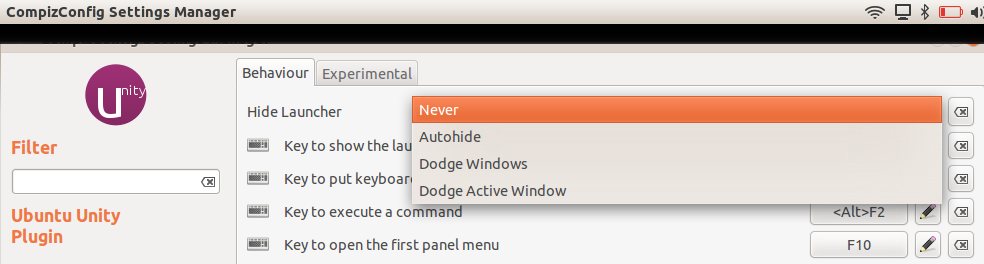
From the CompizConfig Settings Manager, search for Unity, and click the first result.


3) From Ubuntu Unity Plugin, change Hide Launcher to: Never


Now, the Unity launcher will never autohide.

Future gripes:

  • where is the show desktop button?
  • how do I use Unity to switch between multiple instances of the same program open. 
    • i.e. Chrome window 1, and Chrome window 2. (assume I've never heard of Alt-Tab). 
    • Perhaps Unity UI team can borrow inspiration from Windows 7, and mousing over an icon in the Unity launcher will then show thumbnails of all running instances of that program.

Friday, April 01, 2011

IntelliJ Idea: Frustrations with "cannot resolve Java"

I'm trying to convert myself to using IntelliJ IDEA, as word on the street is that thats what the power developers are using. I'm pretty sold on NetBeans myself. Its pretty, it works every time, its really intuitive and easy to use, it does the task at hand without cluttering me down with loads of crap.

My initial impressions of IntelliJ IDEA are that, I need to force myself to enjoy using it. Hopefully my obstacles to using IDEA will be resolved so I too can get with the program. In this post I'll shed some light on solving a big nasty roadblock I ran into with IDEA.


The Problem:
IDEA doesn't know what Java is.

My first sign that something is very wrong:
IntelliJ IDEA Cannot resolve symbol 'String'

IntelliJ becomes very annoying when it can't find the JDK. It will however prompt me every 10 seconds, that it recommends me to use org.apache.xpath.operations.String, instead of Java's in-built String. It will recommend me a whole crapload of things, such as detecting Spring, wanting to add IDEA project files to the git repository, but it won't detect that I don't have a JDK set.


The nail in the coffin:
IDEA: Cannot resolve symbol 'java'


This does wonders for programmer happiness, in fact, IDEA actually made me frustrated. Even though IDEA was the only IDE that had a certain feature that would be its selling point for me, all of that erases when it doesn't know what Java is, and doesn't give me Code Completion for String.

The Fix:
Properly set the IDEA Platform JDK for your project/module.

Go to Project Structure (Ctrl+Alt+Shift+A), and ensure that Platform Settings[SDK's] has your path for Java set, in my case /usr/lib/jvm/java-6-sun, and then the main fix:
Set the Project Settings[Project] --> Project SDK to your current JDK. I had mine set to none for the project I was working on. Therefore, no java, no string, no primitive types, no nothing.

Once you set that, it should kick off a reindex, and your project will have full Java support. I suppose during the install of IDEA, it didn't detect Java from the usual places, and decided not to ask me.

Sorry if this is a ranty post, but an uncooperative IDE is almost as bad as code thats not doing what you're intending it to.

Wednesday, February 24, 2010

Communities and Collections in collapsable treelist, plus graphical webui.strength

Also in my dump of visual changes that may or may not be going anywhere is the Communities and Collection page with a jQuery treelist that is expandable and collapsable. As well as changing the default for webui.strengths.show to instead of showing a number, to show a little strength meter from Google Charts.


This is the snippet of code that shows the pretty little image.

out.println("<img src=\"http://chart.apis.google.com/chart?cht=bhs&chs=25x13&chco=4d89f9&chds=0,50&chd=t:" + ic.getCount(comms[k]) + "\" />");